How do my team's hours get logged from jobs?
Put people on the job under Crew. When the job starts, their clocks start on it; when it's finished, they stop. You see the labour cost on the job.
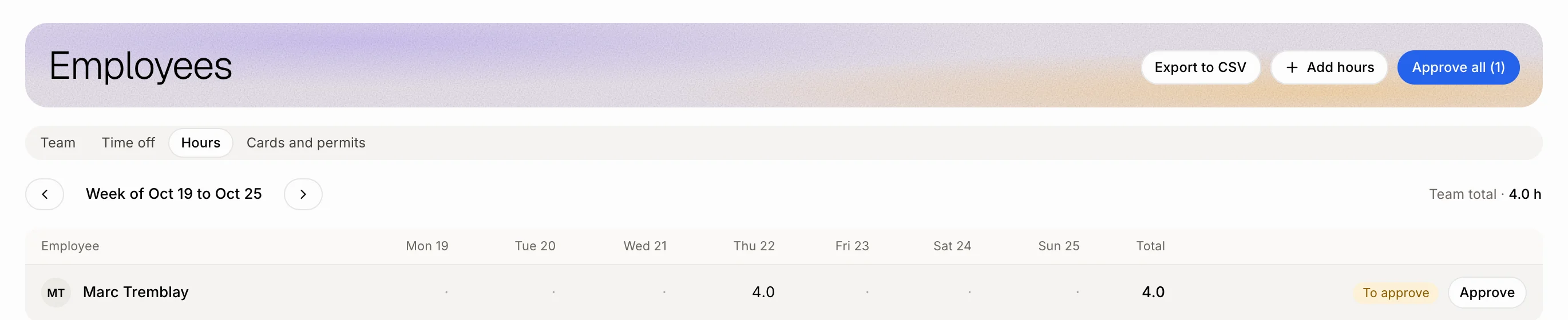
You don't need to clock anyone in by hand. When a job goes to In progress, everyone on it is clocked in on that job. When it leaves In progress (finished, invoiced or moved back), their clocks on it stop. The hours land on each person's timesheet under Employees › Hours.
Also called: timesheet, time tracking, punch in, clock in, crew, labour cost, job costing, feuille de temps, pointage, poinçon, équipe, main-d'œuvre, coût des travaux
Step 1: Put the crew on the job
Open the job. Next to Crew, pick the person leading it. Then tap the teammates working with them: a tapped person is on the job, tap again to take them off. Teammates on the crew see the job even if their role only shows their own jobs.
Click: the job › Crew › the lead › the teammates

Step 2: Start the job
Move the job to In progress (the Start button, the board, or a stage). Each person on the job who has an employee file is clocked in on it right away. If someone's clock was running on another job, it stops there first.
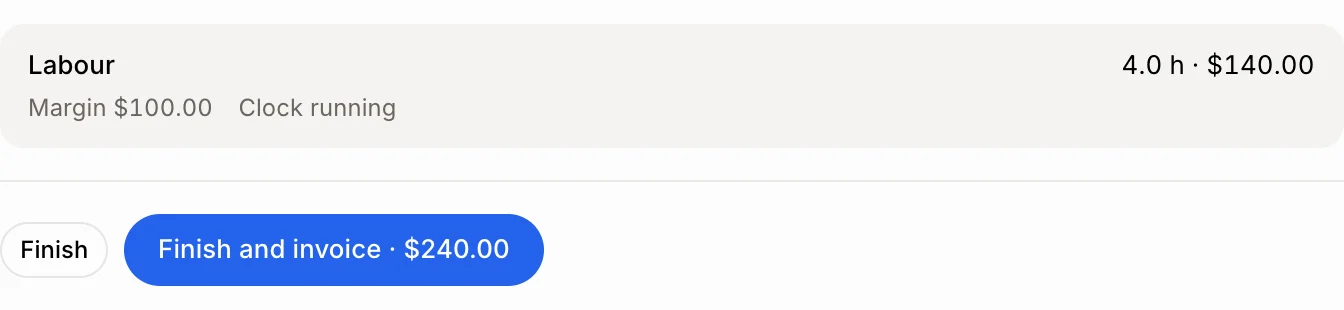
The owner sees Labour on the job: the hours logged on it and what they cost at each person's hourly rate, plus the Margin left from the job's price.
Step 3: Finish the job
Tap Finish or Finish and invoice. The clocks on that job stop. Open Employees › Hours to see the week: each line is tied to its job. You can still fix a line, and approve the week.
Click: Employees › Hours
Good to know
Only people with an employee file get hours. A person without one can still be on the crew.
Labour needs an hourly rate on each person's employee file.
Labour and Margin show to owners only, like hourly rates. Overtime is paid by the week, so a job counts its hours at the regular rate.
A clock stopped in the same minute it started records nothing.
You can ask Ask Alori: "Put Luis and Marc on the Chen job" or "What did the Chen job cost me in labour?"
If it doesn't work
Nobody got clocked in. Check that the people on the job have an employee file linked to their login.
"Someone on it has no hourly rate." Add an hourly rate on that person's employee file so the labour cost is complete.
You don't see Crew. You're the only person on the team, or your role can't plan jobs.