How do I record an in-person meeting?
Tap Record meeting on your phone or computer, set it on the table, then tap Stop and get notes. Alori writes the transcript and summary.
Tap Record meeting on your phone or computer, put it on the table, and talk. When you're done, tap Stop and get notes. Alori writes the transcript, a summary and the next steps, the same as for a video meeting.
Also called: record a visit, voice memo, notetaker, meeting notes, in-person recording, enregistrer une réunion, enregistrer une rencontre, notes de réunion
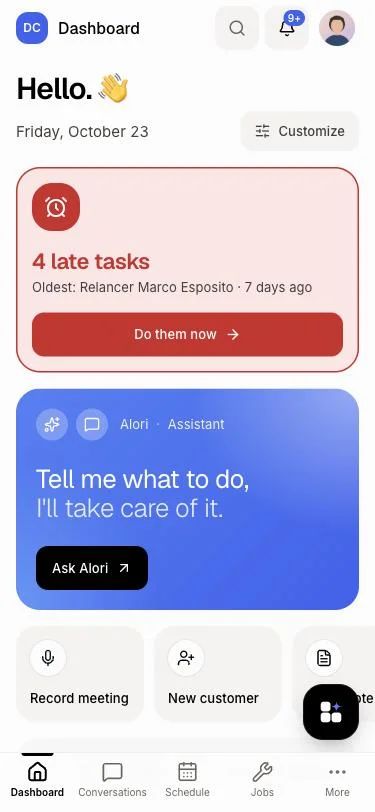
Step 1: Tap Record meeting
On Home, tap Record meeting. It's the first shortcut. Your phone asks to use the microphone the first time: allow it.
Click: Home › Record meeting
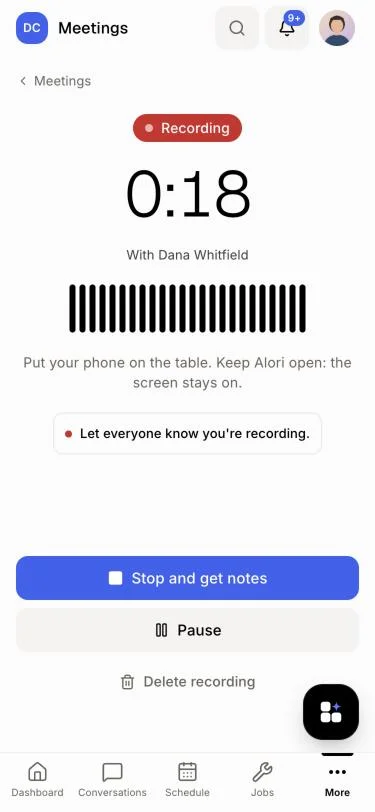
Step 2: Put your phone on the table
Recording starts right away. You see Recording, the time and the sound level. Let everyone know you're recording. Keep Alori open: the screen stays on by itself. Tap Pause for a break, then Resume.
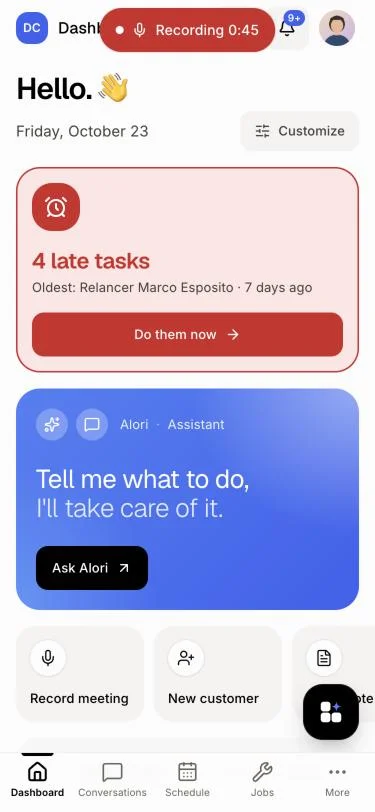
Step 3: Look something up if you need to
You can open a customer or a quote during the meeting. It keeps recording, and a red Recording pill at the top of the screen shows the time. Tap it to go back.
Step 4: Tap Stop and get notes
Tap Stop and get notes. You see Sending… %, then the meeting opens. The summary, next steps and transcript show up there in a few minutes. To listen to it again, open the Recording tab.
Click: Stop and get notes
Record it for a customer
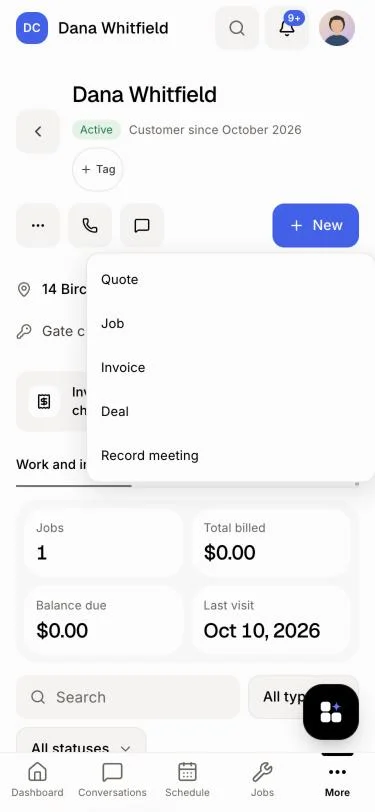
To link the meeting to a customer, start from them instead. On the customer's page, tap + New › Record meeting. On a deal, tap Record. For an in-person meeting you planned, tap Start recording on the meeting or its calendar event. The notes go on that meeting.
Click: Customers › a customer › + New › Record meeting
Good to know
Started from Home, it's called In-person meeting. Rename it on its page, or link the customer there.
The notes use credits like a recorded video meeting's.
A meeting can be up to 4 hours long.
If the tab closes or the phone dies, nothing is lost. Next time, Home shows A recording wasn't sent: tap Send.
If it doesn't work
"Alori can't use the microphone." Allow the microphone for this site in your browser settings, then tap Try again.
"This browser can't record meetings. Use Safari or Chrome." Open Alori in Safari or Chrome.
"The microphone stopped (a call or another app took it)." Tap Stop and get notes to send what was recorded.
"The file didn't finish sending. Check your connection and try again." Tap Try again on a steady connection. The recording stays on your phone until it's sent.
"You're out of credits." Add credits, then tap Try again.