How do I group Team chat channels into categories?
Click the folder + beside Channels, name the category, then use a channel's ⋯ › Move to a category. Everyone on the team sees the same categories.
In Team chat, click the folder + beside Channels and name your category. Then open a channel's ⋯ menu and click Move to a category. Like Discord, a category groups channels and voice rooms, and everyone on the team sees the same ones.
Also called: Discord categories, channel groups, sections, folders, organize channels, catégories, groupes de canaux, dossiers
Step 1: Make a category
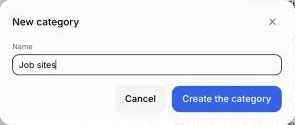
In Team chat, click the folder + beside Channels. Type its name, like "Job sites", then click Create the category. It shows on everyone's sidebar, under your other channels.
Click: Team chat › folder + › Create the category

Step 2: Put channels in it
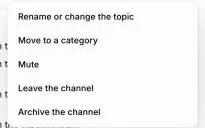
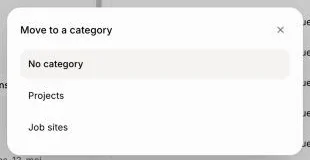
Open a channel, click ⋯ at the top right, then Move to a category and pick one. No category puts it back under Channels. Voice rooms move the same way, from their own ⋯ menu. The + beside a category makes a new channel right inside it.
Click: ⋯ › Move to a category › Job sites
Step 3: Fold, rename or move a category
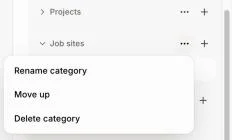
Click a category's name to fold it away, and again to open it. This only changes your own sidebar. Click its ⋯ to Rename category, Move up, Move down or Delete category. Deleting a category keeps its channels and voice rooms: they go back under Channels and Voice rooms.
Click: category's ⋯ › Rename category, Move up or Delete category
Good to know
Anyone on the team can make and arrange categories. Guests only see the categories that hold their channels.
You can also ask Alori: "put the job site channels in a Job sites category".
Importing from Discord (Import data › Discord) brings your server's categories over as they are.
If it doesn't work
"A category already has this name." Pick another name.
"This app has as many categories as it can (50)." Delete one you don't use, then make the new one.