How do I get new Alori features automatically?
Turn on Auto upgrade in Settings. Once a day, your app then gets the newest Alori version by itself, without clicking Upgrade.
Turn on Auto upgrade in your Alori Settings. Once a day, at night, your app upgrades by itself to the newest Alori version. You never have to click Upgrade.
Also called: auto-upgrade, upgrade automatically, automatic updates, always newest version, latest features, mise à niveau automatique, mettre à jour automatiquement, nouvelles fonctionnalités
Step 1: Turn on Auto upgrade
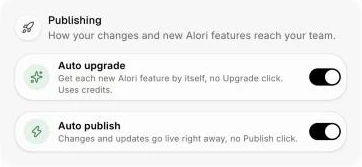
Click your name at the top right, then Settings. Under Publishing, turn on Auto upgrade. It saves right away. If an upgrade is already waiting, it starts now.
Click: your name › Settings › Publishing › Auto upgrade
Step 2: Turn on Auto publish too
Want each upgrade to go live for your team by itself too? Turn on Auto publish right below it. With both on, your team always has the newest Alori.
Good to know
Once a day. Alori checks for a new version every night and upgrades your app if there is one. Want something new right now? Click Upgrade at the top of your screen.
It uses credits. Each upgrade uses credits, the same as clicking Upgrade. With no credits left, it waits for the next night.
Your changes come first. If something you changed doesn't fit the new version, Alori asks you in the chat before updating.
Your whole account. Auto upgrade covers every app on your Alori account.
Turn it off anytime. Turn the switch off, and the Upgrade button is back at the top of your screen when a new version is out.
Undo anytime. Every version is kept. To go back, see How do I undo a published update?
Ask your bot. You can also say "turn on auto upgrade" to your bot, in the Chat, or to Claude.
If it doesn't work
The upgrade hasn't started. You were asking for a change in the chat. Alori tries again a few minutes later.
"I couldn't apply this update, so nothing was modified." Your app wasn't changed. Alori tries again two hours later, up to 3 times for each new version. After that, click Upgrade at the top of your screen when you're ready.
Nothing happens. Check that you have credits left on your account.