How do I link my own GitHub?
Open Connectors and click Connect on My GitHub, under Just for you. Your bot then works on code as you, with your own GitHub access. It's private to you.
Each teammate links their own GitHub. Open Connectors and click Connect on My GitHub, under Just for you. When you ask your bot to read code or open a pull request, it does it as you: it sees what you can see, and the pull requests show your name. It's private: it changes nothing for anyone else on your team.
Also called: GitHub account, code, pull request, repository, dépôt, lier GitHub, mon GitHub
Step 1: Open Connectors
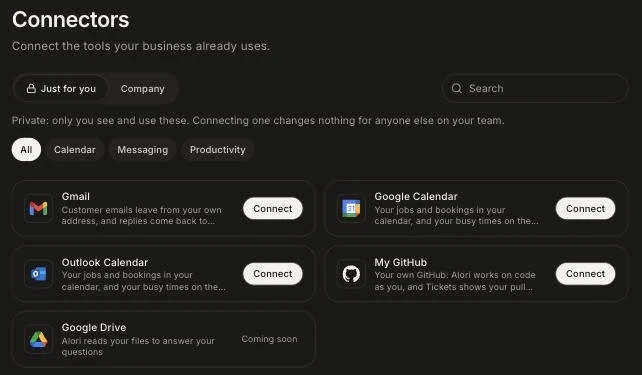
Click the grid menu at the top right, then Connectors. My GitHub is under Just for you.
Click: Connectors › Just for you
Step 2: Connect My GitHub
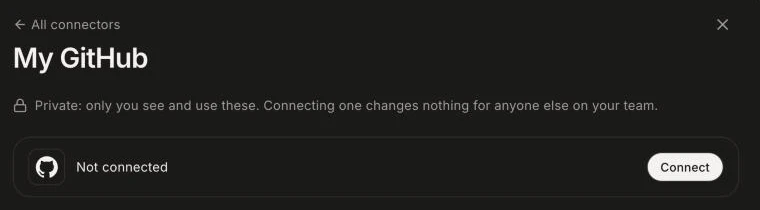
Click Connect on My GitHub. Sign in on GitHub's page and click Authorize. You come back with "My GitHub is connected."
Click: My GitHub › Connect
Then ask your bot
Talk to your bot as usual: "fix the typo on the pricing page", "what did we ship this week?". It works with your GitHub. If you haven't linked it yet, the bot sends you the link to this page.
To have a pull request show on a ticket, put the ticket's number in its title, like DEV-7 Fix the login. The bot does this when you ask it to work on a ticket.
Good to know
My GitHub is yours. GitHub, in the Company tab, is your company's: automations and the bot in a shared Slack or Discord channel use it, since no one person is behind them.
Everyone links their own GitHub, whatever their level. GitHub decides what each person can see and change.
Manage › Disconnect stops the bot from working as you. Repositories you added in the CRM's Settings › Tickets keep sending their pull requests.
If it doesn't work
"My GitHub could not connect. Try again." Click Connect again and click Authorize on GitHub.
My GitHub shows "Needs reconnect": GitHub refused the access, often because it was removed in GitHub's settings. Click Manage › Reconnect.
"This connector is not configured yet." Contact support.
Your organization on GitHub may block Alori. Ask an organization owner to approve Alori in the organization's settings on GitHub.